Recently I got a new computer* so in continuity with my other posts on sandboxes I figured we should take a look at how many agent sandboxes we can fit in it to get an intuition on how they work.
Here's the computer we will be playing with!
rohan@oxroute:~$ fastfetch
                             ....              rohan@oxroute
              .',:clooo:  .:looooo:.           -------------
           .;looooooooc  .oooooooooo'          OS: Ubuntu 26.04.1 LTS (Resolute Raccoon) x86_64
        .;looooool:,''.  :ooooooooooc          Host: 81X8 (IdeaPad 3 15ITL05)
       ;looool;.         'oooooooooo,          Kernel: Linux 7.0.0-38-generic
      ;clool'             .cooooooc.  ,,       Uptime: 6 days, 15 hours, 21 mins
         ...                ......  .:oo,      Packages: 1304 (dpkg), 3 (snap)
  .;clol:,.                        .loooo'     Shell: bash 5.3.9
 :ooooooooo,                        'ooool     Display (BOE0816): 1366x768 in 15", 60 Hz [Built-in]
'ooooooooooo.                        loooo.    Terminal: /dev/tty1
'ooooooooool                         coooo.    Terminal Font: VGA default kernel font 8x16x512
 ,loooooooc.                        .loooo.    CPU: 11th Gen Intel(R) Core(TM) i3-1115G4 (4) @ 4.10 GHz
   .,;;;'.                          ;ooooc     GPU: Intel UHD Graphics G4 @ 1.25 GHz [Integrated]
       ...                         ,ooool.     Memory: 1.21 GiB / 7.05 GiB (17%)
    .cooooc.              ..',,'.  .cooo.      Swap: 1.85 GiB / 4.00 GiB (46%)
      ;ooooo:.           ;oooooooc.  :l.       Disk (/): 71.16 GiB / 97.87 GiB (73%) - ext4
       .coooooc,..      coooooooooo.           Local IP (wlp0s20f3): 10.0.0.10/24
         .:ooooooolc:. .ooooooooooo'           Battery (L16M2PB2): 95% [AC Connected]
           .':loooooo;  ,oooooooooc            Locale: en_US.UTF-8
               ..';::c'  .;loooo:'

rohan@oxroute:~$
Agent sandboxes are a quickly growing area of interest because AI agents require environments to operate in.
Since we have seen a steady increase in the capability of agents to work over longer periods of time we would expect that the amount of compute dedicated to agent sandboxes would increase accordingly.
This growth is so steep that some believe that in the near future we may not even have enough CPUs to meet all the demand they will create.
Whether that ends up being true or not, it clearly is worthwhile to see what these sandboxes are and what optimizations we can apply to operate them as efficiently as possible.
A Hill to Climb
For this to be useful experiment I needed to have a benchmark which roughly reflects agent behavior.
So to start I recorded 26 real opencode agent sessions where the agent is doing things like explaining a repo, fixing a failing test, adding a command line entry point, etc.). You can find these session files here
A simulated tenant alternates between being away (averaging two minutes away with a log normal distribution) and messaging the agent a task.
This aims to replicate the user behavior of periodically checking your phone and replying to the agent.
When it has a task it picks a recorded session at random, copies the starting project into its workspace and replays the calls with their recorded think times.
We will say a run passes at n tenants if the p99 of the latency it adds to a call stays under 1.5 seconds, with no errors and no out-of-memory abort.
Level 1: Cold Boots
PUT /boot-source     {"kernel_image_path": "vmlinux-6.1.128",
                      "boot_args": "console=ttyS0 reboot=k panic=1 pci=off sandroute.workspace=/work sandroute.port=5000"}
PUT /drives/rootfs   {"path_on_host": "rootfs.ext4", "is_root_device": true, "is_read_only": true}
PUT /machine-config  {"vcpu_count": 1, "mem_size_mib": 256}
PUT /vsock           {"guest_cid": 3, "uds_path": "v.sock"}
PUT /actions         {"action_type": "InstanceStart"}
Let's start off with a standard Firecracker MicroVM, and cold boot one for each tenant.
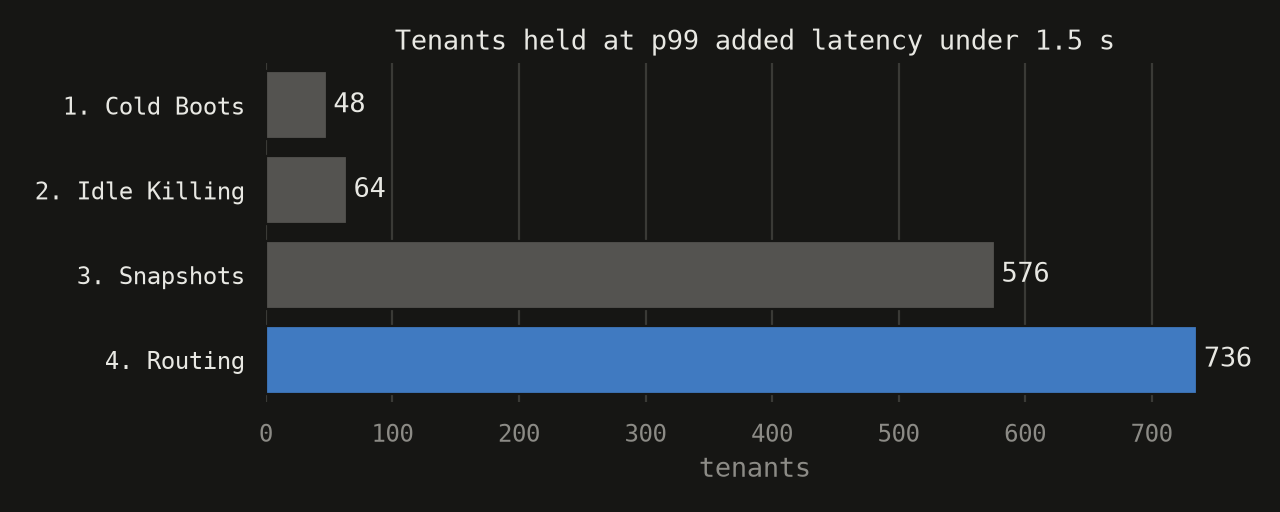
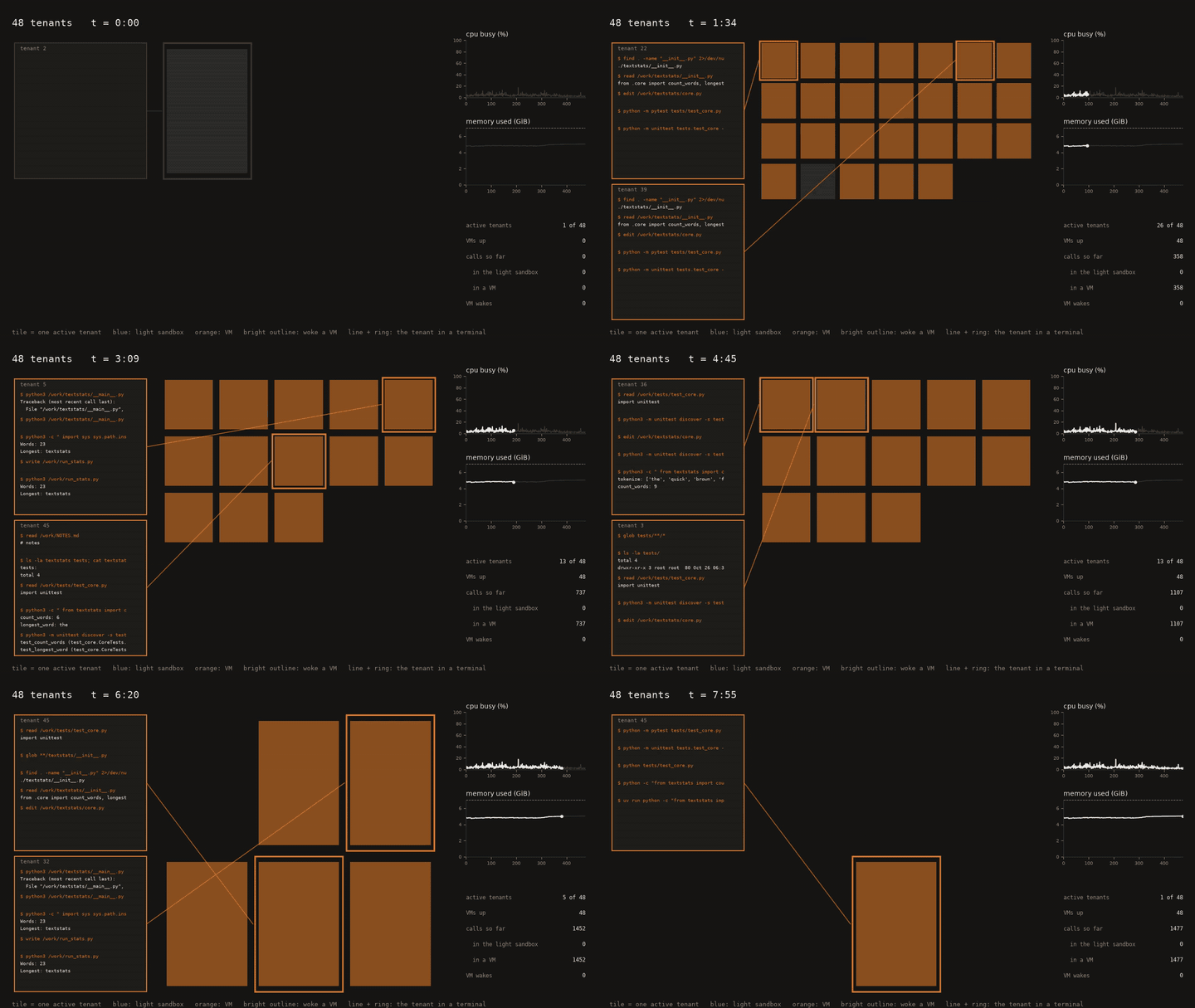 This gets us to ~48 tenants with the machine running out of memory at 64.
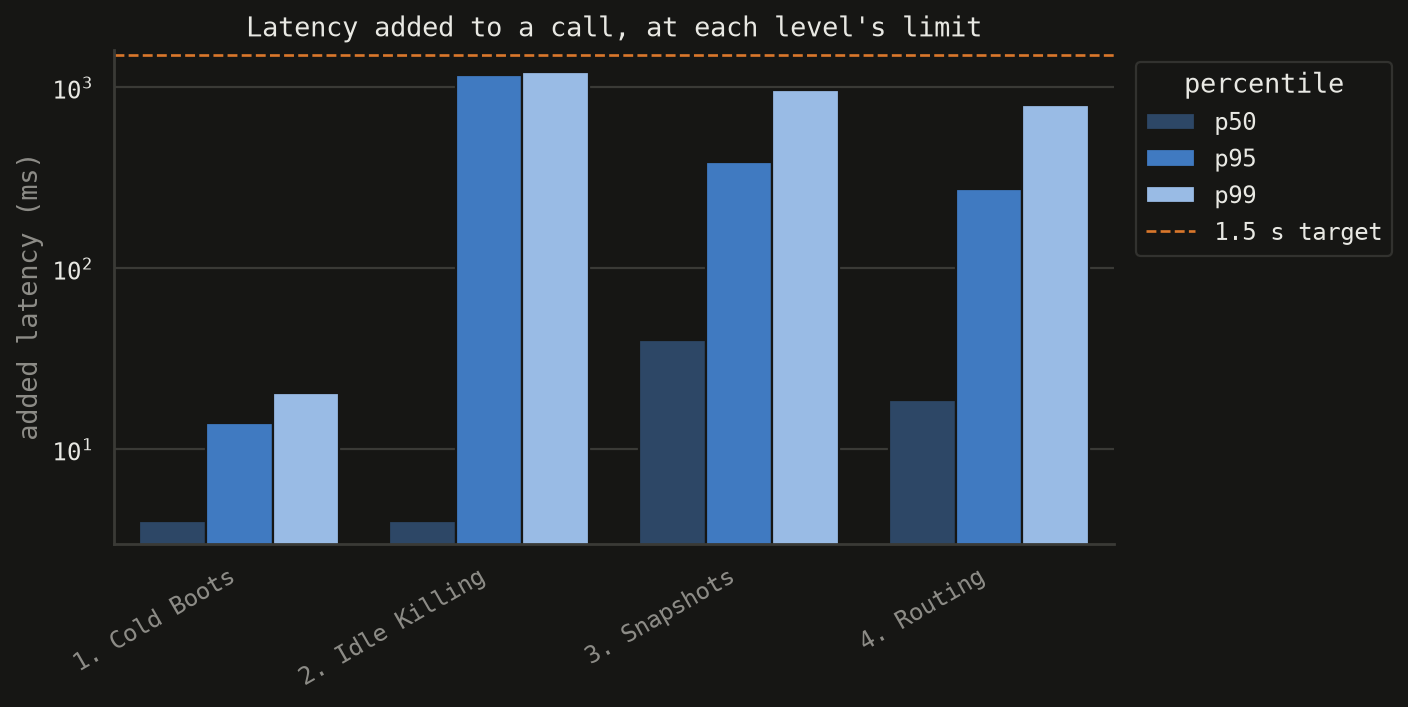
Each VM costs about 113 MiB of host memory even when it does nothing just from the guest kernel and agent, but the latency is excellent (p99 of 20 ms) because every VM is already there.
Level 2: Idle Killing
Most tenants are idle most of the time, so killing them after 30s of inactivity is a fast win.
Then when a new message is sent the VM boots again and the disk reattaches.
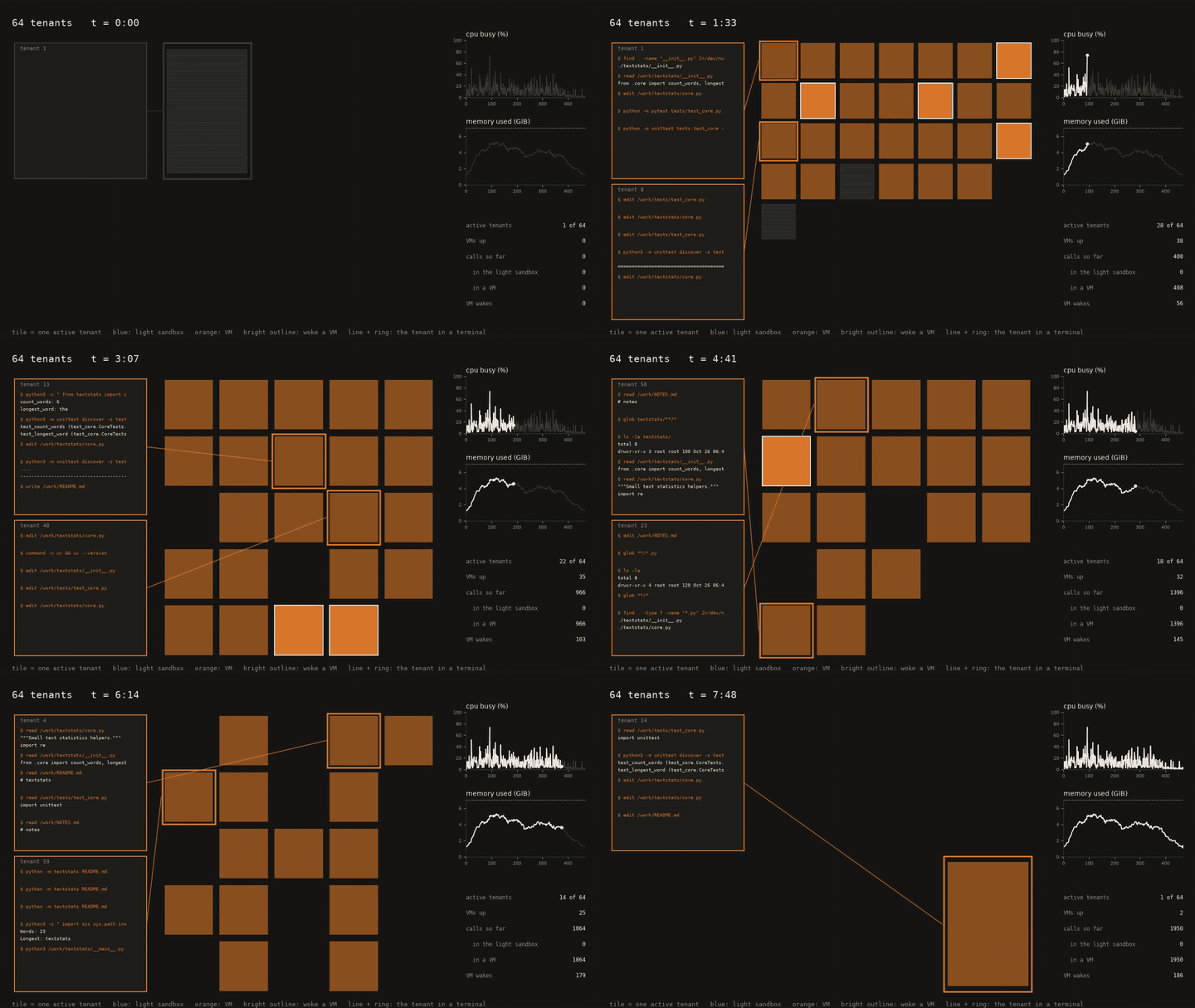
This tactic allows us to grow from 48 to ~64 tenants.
One downside is that now about 1 call in 11 wakes a VM, and a cold boot of a guest kernel costs 1.2 seconds, so the p99 rises to 1.2 s even with only 64 tenants.
Level 3: Snapshots
Booting is the expensive part, but every boot does basically the same thing. So we can speed it up by booting one VM, waiting for the agent to come up, pausing it, and writing its memory to a file. Every tenant's VM is then restored from that file with the memory mapped copy on write, so a VM only holds the pages it has changed.
# once: boot a VM, wait for the agent, then
PATCH /vm               {"state": "Paused"}
PUT   /snapshot/create  {"snapshot_type": "Full", "snapshot_path": "pristine.snap", "mem_file_path": "pristine.mem"}

# per tenant, on a fresh firecracker process, instead of the boot calls above:
PUT   /snapshot/load    {"snapshot_path": "pristine.snap",
                         "mem_backend": {"backend_type": "File", "backend_path": "pristine.mem"},
                         "resume_vm": true}
This uses a read-only root drive, because restoring over an image another VM has written corrupts the filesystem, and a snapshot taken while the workspace is empty, because the host owns the workspace and pushes it in on every wake.
One other optimization aside from the core sandbox is we added an init script which imports Python's standard library before the snapshot, so a wake that runs python3 -m unittest costs 161 ms of cpu instead of 530.
Furthermore since a restore now takes tens of milliseconds, the idle killing can become even more aggressive.
A window of 5 seconds turned out to be best.
When a VM is released it is killed if the guest holds nothing outside the workspace and /tmp, because the workspace lives on the host and is pushed back in on the next wake.
A guest that really did install something, a pip install say, keeps a snapshot in two alternating slots, so a failed write never destroys the last good one.
Snapshotting every released VM is the naive version, and at about 400 tenants it wrote 11 to 13 GiB and ran out of disk bandwidth.
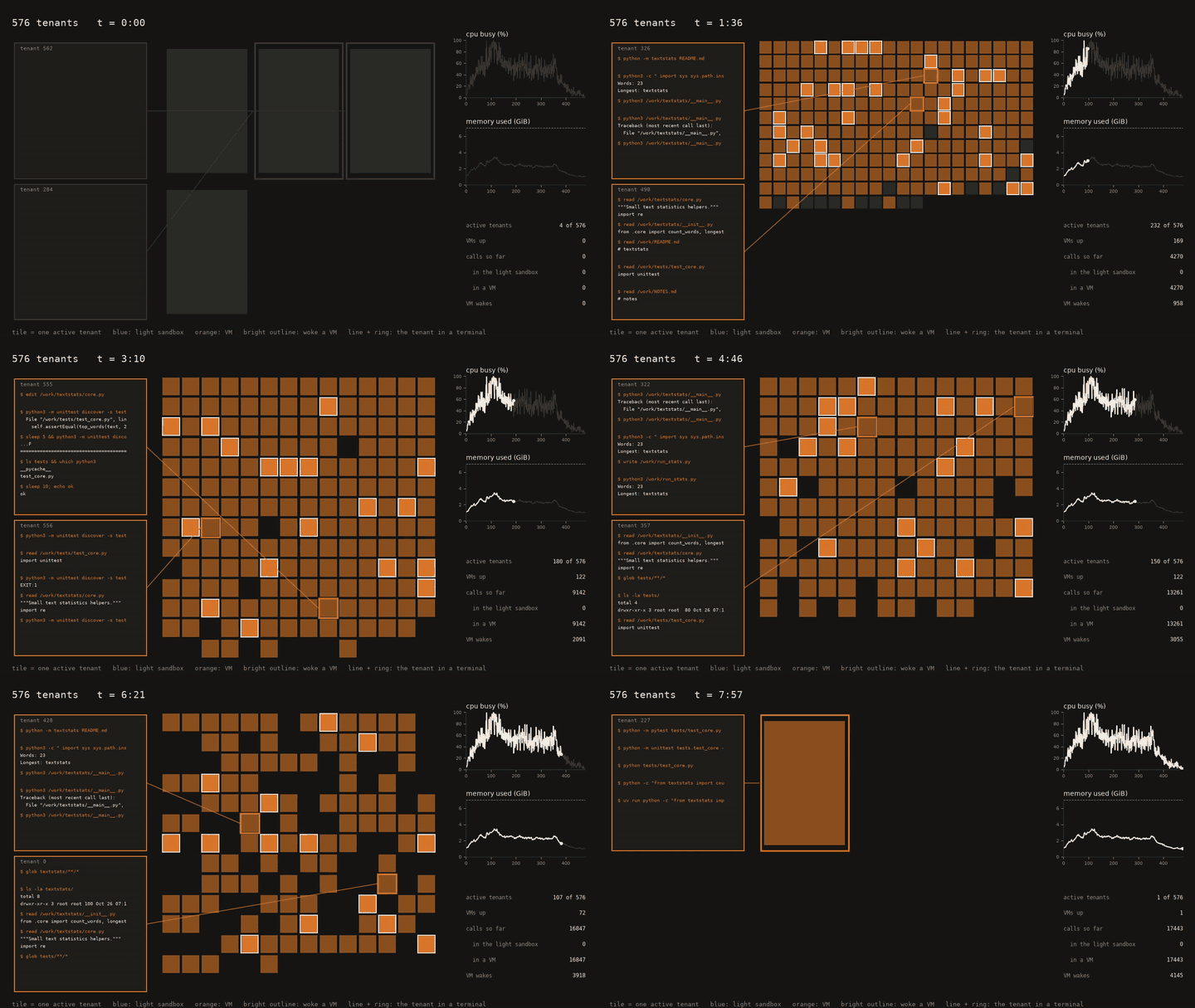
This brings us from 64 to 576 tenants.
Also as you can see comparing this demo's graphs to the prior graphs we are now CPU bound instead of memory bound.
Most wakes are fast (median of 88 ms) but 576 tenants caused about 4,100 wakes in six minutes, and when many land at once they queue up on the four cpu threads.
That queueing is what pushes the p99 (the slowest 1 call in 100) up to about 1 s, and why runs fail ~576 tenants.
Level 4: Routing
So far we have only tuned the VM, so let's do some out of the box thinking (obligatory) and avoid the VM.
224 of the 304 recorded calls (74%) never needed a big computer since they are the file tools (read, edit, write, glob, grep) and shell commands like ls, cat and sed.
This makes sense, because a lot of what an agent does is read parts of the codebase and its memory files.
So the router sends those file level calls to a lighter sandbox in this case bubblewrap plus a seccomp filter. This is the intuition behind sandroute.
bwrap --unshare-all --unshare-user --disable-userns --cap-drop ALL --seccomp 3 \
      --die-with-parent --new-session --clearenv \
      --ro-bind /usr /usr --symlink usr/bin /bin --symlink usr/lib /lib --symlink usr/lib64 /lib64 \
      --proc /proc --dev /dev --tmpfs /tmp \
      --bind $WORKSPACE /work --chdir /work \
      bash -c "$COMMAND"
Only the tenant's workspace and a private /tmp are writable, there is no network, and the filter is the Docker default profile's 299 allowed calls with clone3 refused and clone refused if it asks for a namespace.
A command costs about 6 ms, against 2.4 ms bare and 7.5 ms in a warm VM.
The orchestrator starts each command with posix_spawn and not fork, because a fork copies the parent's page tables and with hundreds of tenants the parent is hundreds of megabytes, so the cost stays about 6 ms whatever the size of the host process.
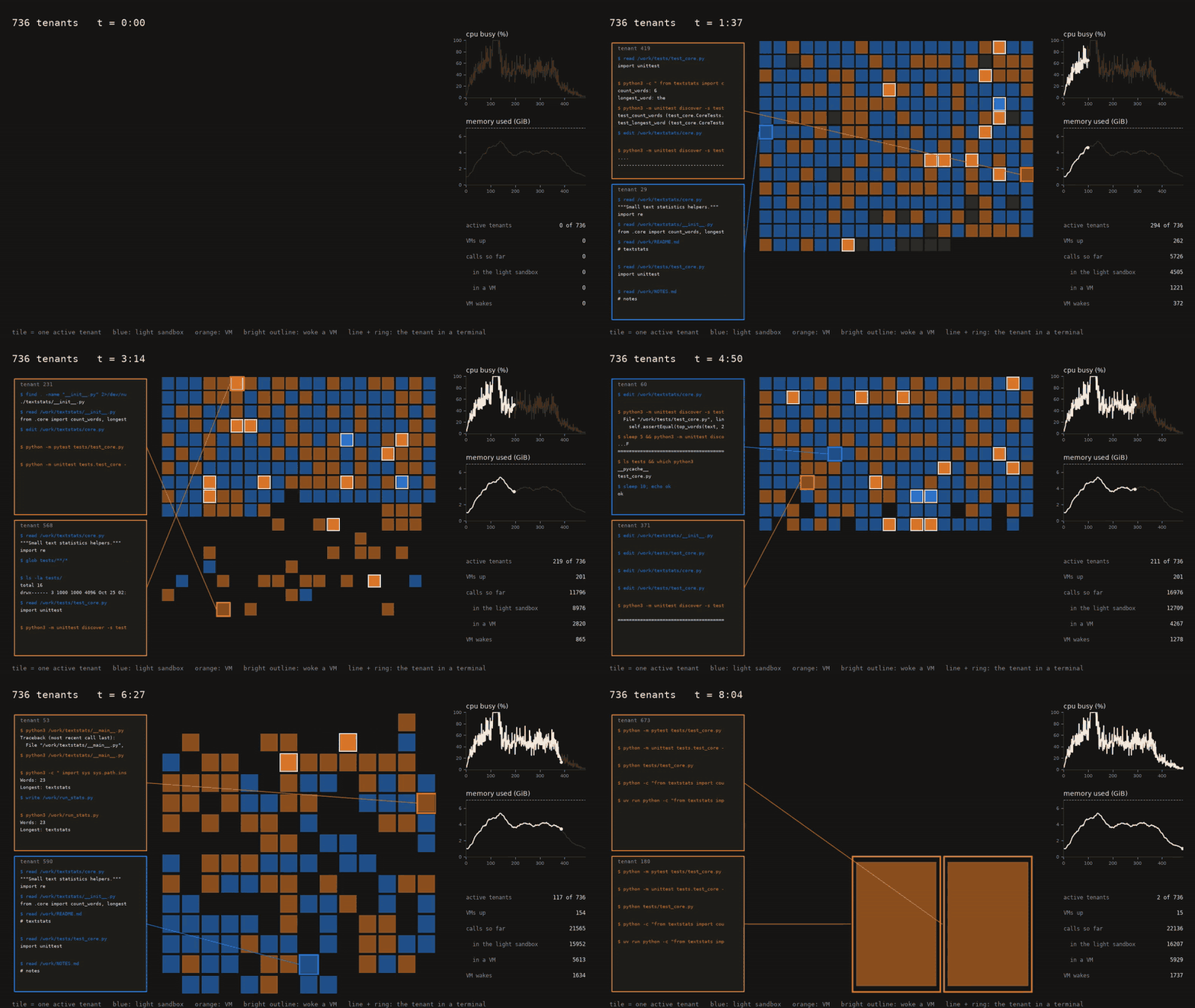
This routing now boosts us to 736 tenants, 160 more than Level 3, which is less of a gain than you might expect for removing the whole micro-VM. At their limits Level 3 handles 576 tenants making about 17,400 calls with about 4,100 wakes at 44% mean cpu, and Level 4 handles 736 tenants making about 22,100 calls with about 1,740 wakes at 46%. Routing removed most of the wakes, but as we've seen before the limit is set by bursts and not the average. When many tenants start a turn at once there are more wakes and Python test runs than the four cpu threads can run at once which can push the p99 past 1.5 seconds even though the machine itself is half idle.
In Review
This was a productive experiment in that the idea of intelligently routing in sandboxing seems very exciting to me as an avenue to keep exploring to try to squeeze out the last bits of performance from sandboxing software.
That being said this also showed the limitations of using just one set of runs as a benchmark because the profile of the tenant activity (how bursty is it, the proportion of different types of commands) certainly changes the returns we get from our optimizations. I'll talk about this more in the Next Steps section.
Try it yourself
Here is roughly the script to start 100 sandboxes in sandroute:
async fn run_single_sandbox(idx: usize) -> anyhow::Result<()> {
    // Create an isolated sandbox
    let sandbox = Sandroute::create_with(1, 512).await?; // 1 vCPU and 512 MiB for the VM
    let random = format!("{idx}-{:x}", SystemTime::now().duration_since(UNIX_EPOCH)?.as_nanos());

    // Write a file inside the sandbox
    sandbox.write_file("random.txt", &random).await?;

    // Read it back with a command
    let res = sandbox.run("cat random.txt", None).await?;
    println!("Sandbox {idx}: {}", res.stdout.trim());
    sandbox.close().await
}

#[tokio::main]
async fn main() -> anyhow::Result<()> {
    // Spin up the sandboxes simultaneously
    let tasks: Vec<_> = (0..100).map(|i| tokio::spawn(run_single_sandbox(i))).collect();
    for t in tasks { t.await??; }
    Ok(())
}
It is examples/hundred.rs in the repo, and you run it with cargo run --release --example hundred 100 once the VM image is built.
I aim to make the sandroute developer experience as easy to use as other tools but with some more opinionated defaults and the router which make optimizations easier to write.
Here is how to make 100 sandboxes using microsandbox which is a popular library for this:
async def run_single_sandbox(idx: int):
    # Spin up an isolated microVM asynchronously
    sandbox = await Sandbox.create(f"bench-{idx}", image="python", cpus=1, memory=256)
    try:
        random_str = uuid.uuid4().hex

        # Write file inside sandbox
        await sandbox.fs.write("/tmp/random.txt", random_str.encode())

        # Read or verify back
        res = await sandbox.exec("cat", ["/tmp/random.txt"])
        print(f"Sandbox {idx}: {res.stdout_text.strip()}")
    finally:
        await sandbox.stop_and_wait()
        await Sandbox.remove(f"bench-{idx}")
All three, on the same laptop, a hundred sandboxes at once, each with a 256 MiB guest:
| the read runs in | time | host memory used | |
|---|---|---|---|
| microsandbox | a microVM (cat) |
8.6 s | 4.6 GiB |
| sandroute | a microVM (python3) |
2.0 s | 242 MiB |
| sandroute | the light sandbox (cat) |
0.8 s | 23 MiB |
Sandroute would normally run a cat in the light sandbox, so the second row reads the file with Python, which it does not route to the light sandbox, to make sure the read runs in a microVM like microsandbox's does.
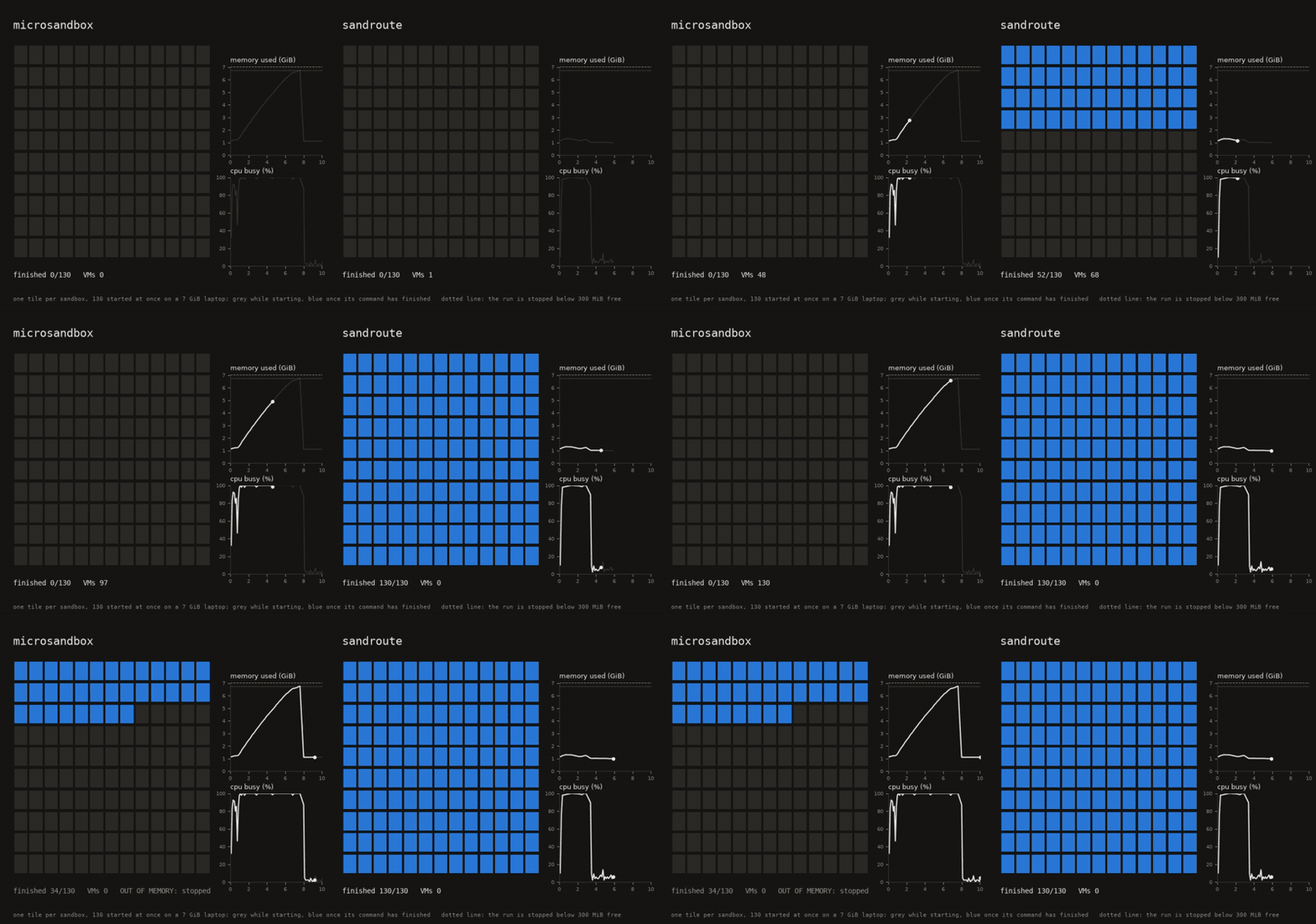
I should clarify that this necessarily isn't a comparison in possible performance since microsandbox starts all of its VMs at the same moment here, and a smaller number could work if they were started a few at a time.
Next Steps
My goal is to continue to push sandroute even farther to push the limits on sandbox density.
Here are the main threads I'm looking forward to closing next:
-
Routing Intelligence: Right now we route between 2 "sandboxes", but if we had a greater variety we can further optimize for different toolcalls. Furthermore the routing options could even include externally hosted sandbox services so users can intelligently burst to the cloud using the cheapest one available.
-
Diverse Evals: Currently we have built the mechanism favoring 1 profile but if we expand the evals to include a diverse set of tenant profiles perhaps we can provide presets which work more optimally. Perhaps this capacity to adjust the sandboxing depending on the tenant workloads could even be moved up into the router.
-
More Offloading: Outside of the file system related commands are there other common types of commands which can safely execute at a lighter degree of isolation than Firecracker? I have some ideas about python and WASM that I'm looking forward to trying out
-
Up the Stack: Currently our signal is the tool call, if the harness sent signals prior to the tool call itself we can use those to improve the routing. For example if the model is undergoing compaction then perhaps we have enough time to spin down and save some compute.
If this seems interesting to you feel free to shoot me a message or star the sandroute repo to follow along.